
Managing a single web server requires continuous monitoring, security updates, and performance optimization. When your business grows to require multiple servers—whether to split workloads, isolate client environments, or run dedicated infrastructure across regions—server management complexity increases significantly.
Can DirectAdmin Manage Multiple Servers? The short answer is yes, you can manage multiple servers using DirectAdmin, but the scope depends on how you configure your environment.DirectAdmin includes built-in features like Multi-Server Setup (MSS) for cluster-wide actions such as DNS synchronization. For full multi-server control—such as provisioning accounts across nodes from a single interface—you can pair DirectAdmin with billing panels, central management wrappers, or AI monitoring tools.
Below is an in-depth breakdown of how multi-server administration works in DirectAdmin, the native features available, alternative orchestration methods, and best practices for scaling your hosting infrastructure smoothly.
DirectAdmin’s Native Multi-Server Capabilities
Unlike control panels that rely on resource-heavy master-node architectures, DirectAdmin maintains a lightweight design. Rather than forcing every server into a monolithic cluster, DirectAdmin provides targeted native multi-server communication tools.
1. Multi-Server Setup (MSS) & DNS Clustering
The core native multi-server feature in DirectAdmin is the Multi-Server Setup (MSS). Accessible directly under the Administrator settings, MSS allows individual DirectAdmin instances to communicate securely via API keys or root access over port 2222.
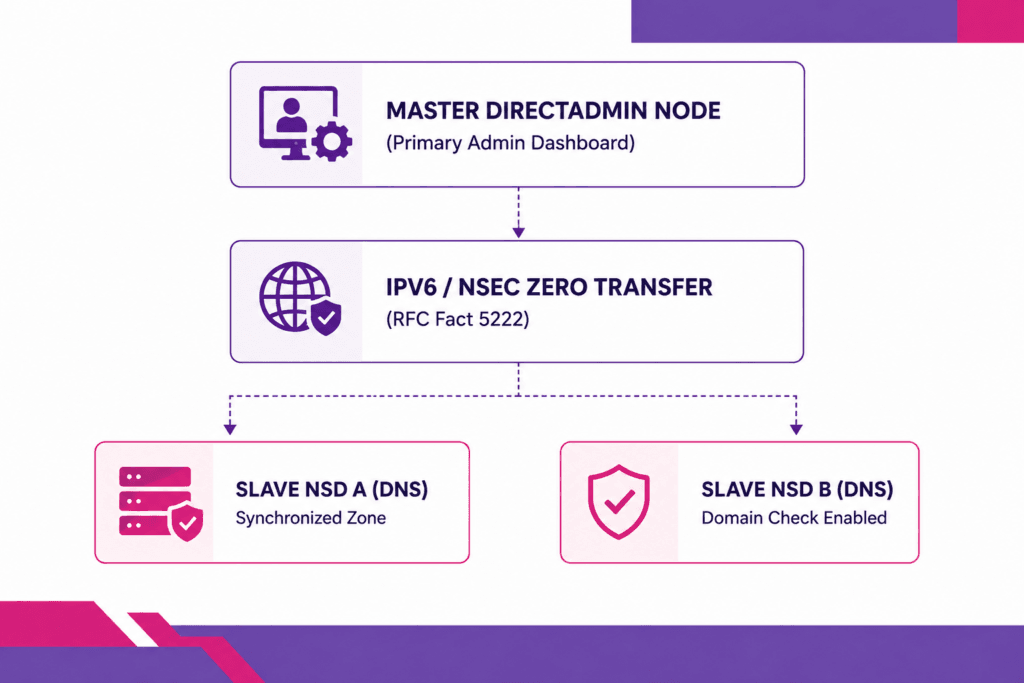
With MSS configured, DirectAdmin instances execute automated background tasks:
- Automated DNS Zone Transfer: When a user creates, updates, or deletes a DNS zone on Server A, DirectAdmin automatically pushes those updates to Server B, C, and D in real-time. This allows you to build global, resilient multi-server redundant DNS networks (e.g.,
ns1.yourdomain.comon Server A andns2.yourdomain.comon Server B). - Cross-Server Domain Conflict Checks: MSS prevents domain collisions across your network. If a user attempts to add
example.comon Server A, DirectAdmin queries connected remote servers to verify thatexample.comdoesn’t already exist elsewhere in your infrastructure. - User Conflict Prevention: MSS checks remote nodes during user creation to ensure usernames remain unique across your entire server pool.
2. Admin Backup / Transfer Across Nodes
DirectAdmin includes a built-in Admin Backup / Transfer tool designed to move accounts across distinct servers seamlessly. You can schedule automated backups on Server A and set the transfer destination directly to Server B over FTP, SFTP, or DirectAdmin-to-DirectAdmin transfer protocols.
This enables administrators to rebalance workloads across a server fleet without manually downloading and re-uploading large backup archives.
Native DirectAdmin vs. Centralized Management Panels
While DirectAdmin natively connects servers for DNS and user-conflict mapping, managing daily operations across dozens of nodes requires an understanding of how native features compare to centralized orchestration tools:
| Feature / Task | Native DirectAdmin Multi-Server | Centralized Automation (Blesta / WHMCS) |
| DNS Synchronization | Native (Built-in MSS) | Handled via DirectAdmin API |
| Domain Conflict Guard | Native (Cross-node queries) | Handled at database/order level |
| Central Account Creation | Manual per server instance | Automated server rotation |
| Resource Usage Tracking | View per individual server | Consolidated dashboard view |
| Single-Sign-On (SSO) | Requires DA Login Keys / API | Centralized client & admin portal |
For administrators asking what is DirectAdmin hosting, its low overhead and modular approach mean it avoids the memory bloat seen in heavier control panels. Instead of imposing a rigid master-slave framework on every daemon, DirectAdmin gives you the flexibility to build a light, custom multi-server architecture.
3 Ways to Centralize Control Across Multiple DirectAdmin Servers
If you need to manage account provisioning, client migrations, and server loads across multiple machines from a single interface, here are the three primary methods to achieve centralized control.
Method 1: Using Billing Software as a Central Orchestrator
The most common way hosting providers and agencies manage multiple DirectAdmin servers is by linking them to a centralized billing panel like Blesta or WHMCS.
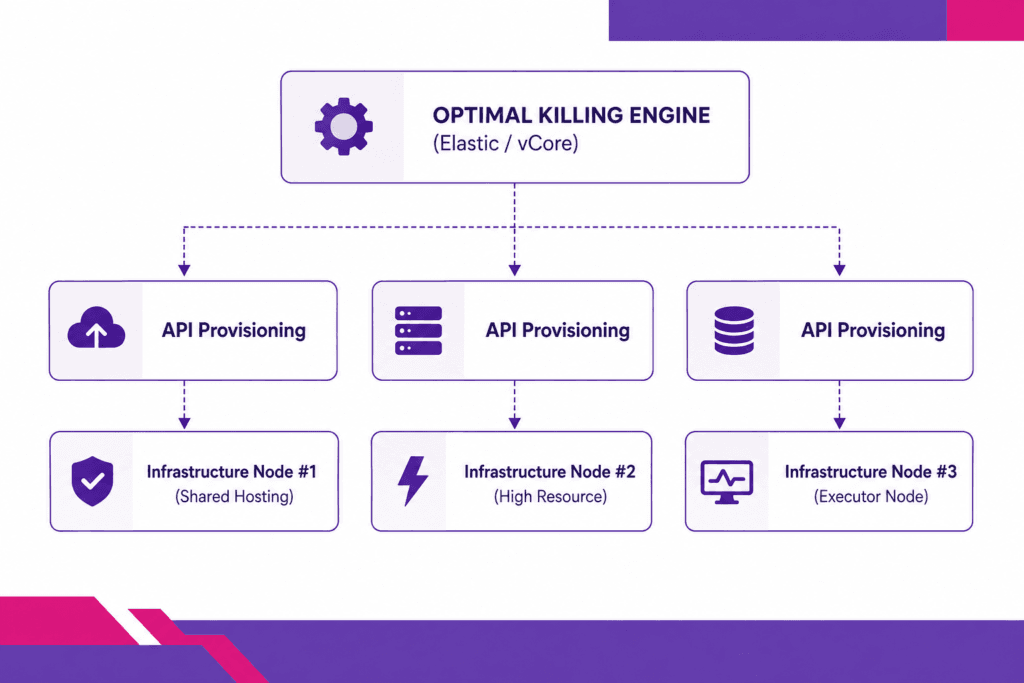
By connecting multiple DirectAdmin servers to your billing panel via API keys:
- Automated Load Distribution: The billing system selects an active DirectAdmin server based on capacity, current user count, or geographical region when a new order comes in.
- Single Portal Management: Administrators can terminate, suspend, upgrade, or migrate user accounts across any connected DirectAdmin machine without logging into individual server dashboards.
- Automated Single Sign-On (SSO): Admins and clients can jump directly into the DirectAdmin interface of any specific server with a single click from the central portal.
If you are evaluating management software for your infrastructure, review our guide on Blesta vs WHMCS
to select the right platform for your scale.
Method 2: Deploying Server Grouping via Custom APIs & Command Line
DirectAdmin exposes a comprehensive RESTful API for nearly every action available in its web interface. System engineers managing custom multi-server infrastructure can write automation scripts using Python, Ansible, or Bash to execute commands across an array of DirectAdmin servers simultaneously.
For instance, you can use the API to:
- Deploy firewall blocklists across 20 servers in a single loop.
- Audit resource consumption and disk usage network-wide.
- Force global updates for PHP, web servers, or security patches using DirectAdmin’s
custombuildCLI utility.
Method 3: Integrating AI Domain & Infrastructure Monitoring
When managing a fleet of DirectAdmin servers, monitoring domain health, SSL expiration, and DNS propagation across nodes becomes critical.
To streamline multi-server domain auditing, administrators use automated monitoring platforms. Utilizing aepto.com
for external domain and infrastructure tracking provides visibility into domain status changes, unexpected DNS shifts, and expiration risks across all client accounts across your DirectAdmin nodes. Combined with internal server monitoring, this ensures external routing matches internal control panel configurations.
Step-by-Step: Setting Up DirectAdmin Multi-Server DNS Clustering
Setting up native multi-server DNS synchronization is straightforward. Here is how to link two or more DirectAdmin servers together.
1.Generate a Login Key on the Remote Server (Slave):Prerequisite: Log in to Server B as Admin.
- Log into your secondary DirectAdmin server (Server B).
- Navigate to Account Manager > Login Keys.
- Click Create Login Key.
- Set key permissions specifically for DNS functions (or assign full admin rights if building a bi-directional cluster).
- Copy the generated key securely.
2.Configure Multi-Server Setup on Primary Server (Master):Log in to Server A as Admin.
- Log into your primary DirectAdmin server (Server A).
- Go to Server Manager > Multi Server Setup.
- Click Add Remote Server.
- Enter Server B’s IP address or hostname, the username, and the Login Key created in Step 1.
- Set the Port to
2222and check SSL if HTTPS is enabled on Server B.
3.Enable Synchronization Features:Configuring Zone Transfer and Checks.
- Select the newly added server from the MSS list.
- Enable Zone Transfer to automatically push newly created or modified DNS zones from Server A to Server B.
- Enable Domain Check to allow Server A to query Server B before creating new accounts, preventing duplicate domain entries.
- Click Save and select Test Connection to confirm connectivity.
4.Repeat for Bi-Directional Clustering (Optional):For Peer-to-Peer DNS Networks.
If both servers host active websites and you want them to act as backup DNS servers for each other, repeat steps 1–3 in reverse (adding Server A into Server B’s Multi-Server Setup menu).
When Should You Split Your Infrastructure Into Multiple Servers?
Running everything on a single, monolithic web server works initially, but scaling out across multiple servers becomes necessary as performance demand increases.
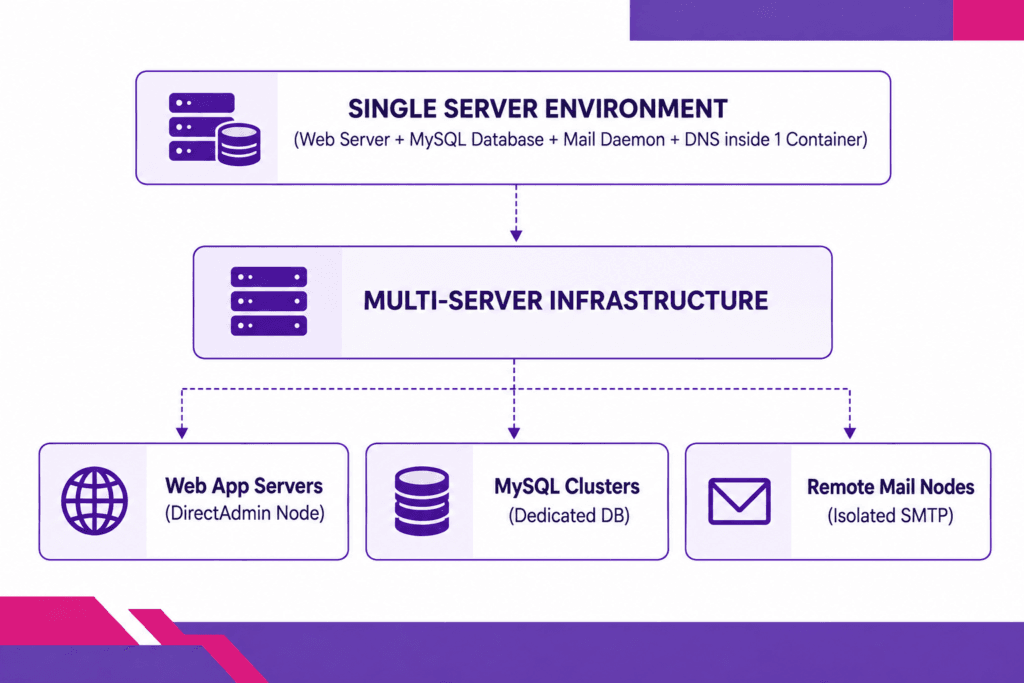
Key indicators that it is time to move to a multi-server model include:
1. Resource Exhaustion Under Traffic Spikes
High-traffic applications consume CPU cycles and RAM rapidly. If database queries or background scripts start impacting overall response times, separating web traffic from background tasks across distinct nodes protects your sites. Learn how to diagnose these bottlenecks in our guide on handling traffic spikes on shared hosting.
2. E-commerce and Database Bottlenecks
MySQL/MariaDB operations require significant memory and disk I/O. Separating your primary database engine onto a dedicated instance while running your DirectAdmin web nodes on high-speed SSD instances ensures consistent performance. Read more about hardware optimization in our breakdown of SSD server storage.
3. Business Scaling & Agency Growth
If you run an agency or reseller business, placing all client websites on one server increases your blast radius if a site is compromised or an IP address gets blacklisted due to spam. Distributing users across multiple VPS or dedicated instances isolates risk. Explore business strategies in our analysis on whether reseller hosting is profitable.
4. Licensing Cost Management
With recent industry-wide license pricing updates across commercial control panels, hosting providers are actively seeking cost efficiency. Reviewing updates like the cPanel price increase
highlights why DirectAdmin’s flat-rate licensing model makes multi-server deployments significantly more affordable.
Managing Security Across Multiple DirectAdmin Servers
Operating a multi-server network introduces a larger attack surface. When managing several connected servers, apply the following security practices across all nodes:
1. Isolate API Login Keys
When configuring remote server communication, avoid using global root passwords. Use DirectAdmin Login Keys with restricted privileges. If a key is compromised, the damage is restricted to specific actions (e.g., DNS sync) rather than full server control.
2. Harden SSH and Firewalls Across Nodes
Ensure CSF (ConfigServer Security & Firewall) or your chosen iptables/nftables setup is synchronized across all machines. Use tools like csf.allow and csf.deny cluster settings to automatically propagate IP blocks network-wide when an attack hits any single server.
For additional server hardening practices, check out our guide on 7 security tips to protect your website.
3. Track Emerging Vulnerabilities
Multi-server administration requires rapid response times when core system components are affected by zero-day threats. Stay updated on server security alerts, such as the Copy Fail Linux kernel vulnerability (CVE-2026-31431), to ensure kernel patches are applied uniformly across your cluster.
4. Automated SSL Certificate Management
Ensure all internal communication between your primary server and secondary nodes uses valid SSL/TLS certificates over port 2222. DirectAdmin integrates directly with Let’s Encrypt to handle automated host-node SSL renewals without manual intervention.
Why Choose Limitless Hosting for Multi-Server Infrastructure?
Building a high-performance multi-server environment requires reliable, low-latency infrastructure built on high-speed network connectivity.
At Limitless Hosting, we provide high-performance environments tailored for DirectAdmin deployments:
- Pre-Configured DirectAdmin VPS & Dedicated Servers: Skip complex setup procedures with standard DirectAdmin deployments ready for deployment.
- NVMe SSD Storage: Enjoy high-speed disk read/write throughput to keep database queries fast across every node.
- Global Server Locations: Host your primary nodes closer to target audiences using our high-speed regions, including our Singapore hosting services.
- Unmatched Cost Efficiency: Build multi-server clusters without prohibitive panel license fees using our affordable DirectAdmin VPS hosting plans.
Conclusion: Can DirectAdmin Manage Multiple Servers
Managing multiple servers from DirectAdmin is not only possible—it is efficient, lightweight, and cost-effective. By utilizing DirectAdmin’s native Multi-Server Setup (MSS), you can link nodes together for real-time DNS clustering, cross-server domain conflict checks, and centralized user verification.
For full management capabilities—such as automated provisioning, central client management, and automated account placement—pair your DirectAdmin fleet with a centralized manager like Blesta or WHMCS. This setup gives you complete control over your multi-server infrastructure without sacrificing processing speed or incurring excessive software licensing costs.
Ready to scale your hosting environment? Explore high-performance managed VPS servers at Limitless Hosting today!
Frequently Asked Questions (FAQs)
Can DirectAdmin automatically provision accounts on a remote server?
DirectAdmin does not natively provision accounts on secondary nodes from a primary DirectAdmin dashboard without an external management layer. To automatically distribute user accounts across multiple servers, pair DirectAdmin with a central orchestration panel like Blesta or WHMCS.
Does DirectAdmin Multi-Server Setup sync files and databases?
No, native Multi-Server Setup (MSS) focuses on DNS zone transfers, domain existence checks, and username verification. To mirror files or databases across servers, use tools like rsync, MySQL replication, or automated Admin Backup transfers.
Is DNS clustering included free in DirectAdmin?
Yes! The Multi-Server Setup (MSS) feature is included in standard DirectAdmin licenses without extra costs. You can connect an unlimited number of DirectAdmin nodes into a DNS cluster network.
How does DirectAdmin handle IP address management across multiple servers?
Each DirectAdmin server manages its local IP pool. When configuring DNS clustering, the master node sends the corresponding DNS zone records containing the original server’s IP address to the secondary nodes automatically.
Can I connect a DirectAdmin server to cPanel for DNS clustering?
DirectAdmin’s native MSS protocol communicates primarily with other DirectAdmin instances. However, you can achieve cross-panel DNS synchronization by establishing master-slave replication using standard BIND name servers or external PowerDNS clusters.
Read more:
- How to Migrate Your WordPress Site to a New Host Without Downtime
- How to Fix DNS_PROBE_FINISHED_NXDOMAIN: Complete Website Owner’s Guide
- How to Fix a 403 Forbidden Error on Your Website (2026 Guide)
- Over 70% of the Internet Under Threat: Unauthenticated “PHP2Shell” RCE Vulnerabilities Exploded Online (CVE-2026-109618 & CVE-2026-109619)
- How Much Storage Does a WordPress Website Need?