
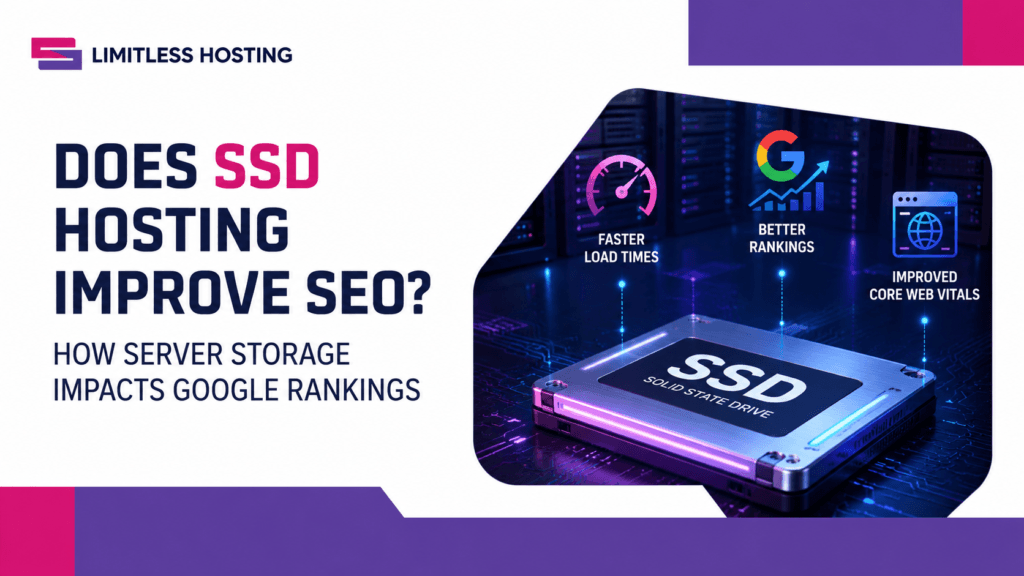
When optimizing a website for search engines, digital marketers and site owners spend hundreds of hours researching keywords, crafting high-quality content, building backlinks, and tweaking meta tags. However, one of the most foundational influences on your search engine optimization (SEO) strategy sits deep within your server stack: your web host’s storage architecture.
As search engine algorithms, most notably Google’s, increasingly prioritize user experience (UX), page rendering speed, and technical efficiency, server hardware performance is no longer just an IT consideration. It is a direct ranking factor.
This brings up a vital technical question for modern website administrators: Does SSD hosting improve SEO, or is it simply a marketing buzzword?
The short answer is a resounding yes. While switching to Solid-State Drive (SSD) or NVMe hosting won’t magically rank a low-quality website at the top of Google, server storage speed directly dictates the technical performance metrics that search engines use to rank websites.
In this comprehensive guide, we will analyze the technical mechanics of SSD hosting, explore how Google measures server response times, examine the direct link between disk I/O and Core Web Vitals, and demonstrate how upgrading your storage infrastructure gives your site a distinct competitive edge in organic search.
Understanding the Hardware: SSD vs. Traditional HDD Hosting
To understand why SSD hosting impacts SEO, you must first understand how server hardware processes data when a user or search engine crawler requests a page from your website.
Traditional HDD Storage
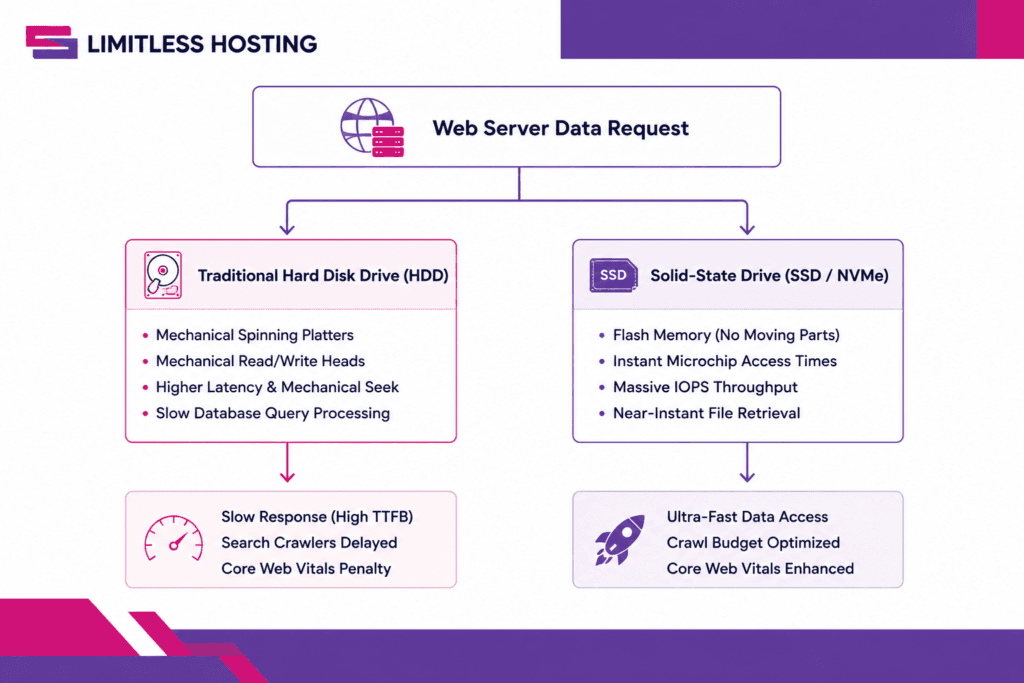
For decades, web servers relied on mechanical Hard Disk Drives (HDDs). HDDs read and write data using physical, spinning magnetic platters and a moving read/write arm. When a visitor hits your URL, the mechanical arm must physically locate the data on the platter. This creates mechanical latency, measured in milliseconds.
Solid-State Drive (SSD) Storage
SSD hosting replaces spinning magnetic platters with non-volatile flash memory chips. Because SSDs have zero moving mechanical parts, data retrieval occurs almost instantaneously via electronic signals. Modern NVMe (Non-Volatile Memory Express) SSDs push these speeds even further by communicating directly with the server’s CPU over PCI Express buses.
If you want a deeper dive into hardware architectures, explore our detailed guide on what SSD server storage is to learn how flash memory handles multi-tenant web enterprise workloads.
4 Technical Ways SSD Hosting Directly Boosts Your SEO
Search engines evaluate hundreds of signals when determining organic search placement. SSD hosting positively influences several of the most critical technical ranking factors.
1. Drastic Reduction in Time to First Byte (TTFB)
Time to First Byte (TTFB) measures the duration between a client browser requesting a webpage and receiving the very first byte of data back from the web server.
Google has explicitly identified server response speed as a key metric for indexing and ranking. A high TTFB (typically over 600ms) indicates a slow server response, which leads to lower search engine evaluations and potential ranking penalties.
When a visitor loads a dynamic website (such as WordPress, Magento, or Laravel), the web server must perform several disk-bound operations before it can generate a single byte of HTML output:
- Load core system execution files.
- Query the SQL database for posts, pages, widgets, and user data.
- Process theme files and active plugins.
- Render the final HTML payload to send across the network.
On an HDD server, reading hundreds of small, scattered files and processing complex database queries causes significant disk read latency. On an SSD-powered server, file access and database queries complete in a fraction of a millisecond. This slashes TTFB, allowing Googlebot and human visitors to receive data almost instantly.
2. Direct Enhancement of Google’s Core Web Vitals
Google’s page experience signals are heavily tied to Core Web Vitals, a set of specific performance metrics that evaluate real-world user experience:
- Largest Contentful Paint (LCP): Measures perceived loading speed. Marks the point when the page’s main content has likely loaded.
- Interaction to Next Paint (INP): Measures user interface responsiveness during interaction.
- Cumulative Layout Shift (CLS): Measures visual stability during page render.
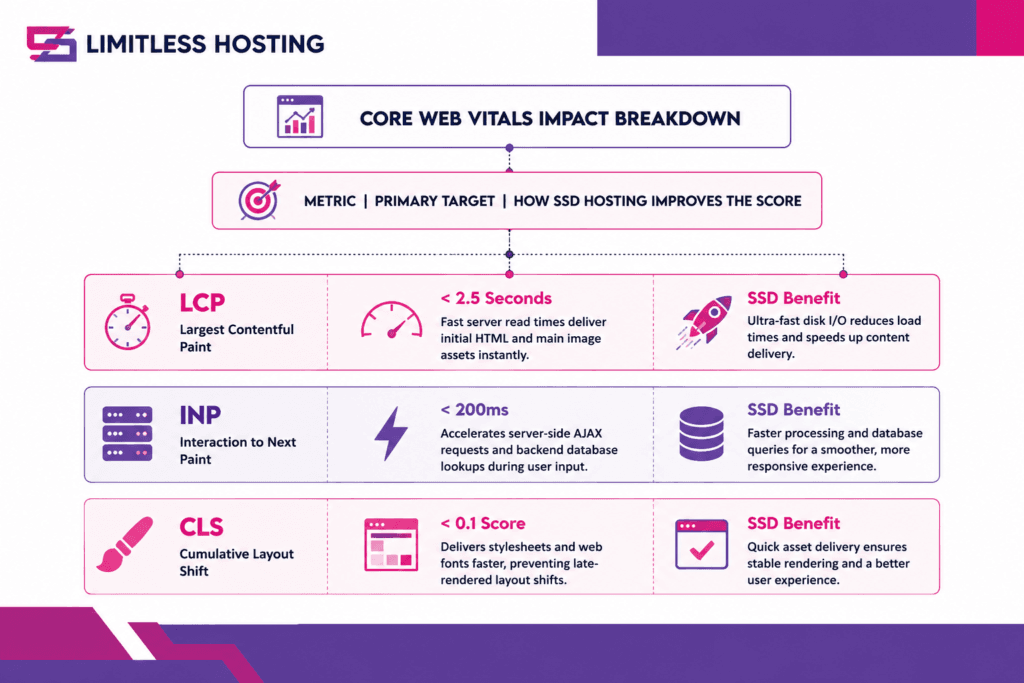
SSD storage directly impacts LCP. If your server takes 1.5 seconds just to process database requests and retrieve the hero image file from disk, your LCP score will easily breach Google's recommended 2.5-second threshold. By eliminating disk bottlenecks, SSD hosting lays the foundation required to pass Core Web Vitals assessments.3. Maximizing Your Search Engine Crawl Budget
Google does not have unlimited time or computing resources to index every page on the web continuously. Instead, Google assigns every website a Crawl Budget, the maximum number of pages Googlebot will crawl on your domain during a given visit.
Googlebot’s crawling behavior is heavily regulated by crawl speed:
- If your server responds rapidly (low TTFB, high disk throughput), Googlebot can crawl dozens or hundreds of pages per second.
- If your server is slow, Googlebot throttles its crawl rate to prevent overloading your server.
For large e-commerce catalogs, news portals, or content-rich blogs, a slow server means Googlebot may only index a portion of your pages. New content takes longer to appear in search results, and updated content takes longer to re-index. SSD hosting ensures your server responds quickly enough to maximize your crawl budget, ensuring rapid indexing across your entire site structure.
4. Handling High Concurrency Without SEO Degradation
A common challenge for growing websites is managing concurrent traffic spikes. When hundreds of users simultaneously browse your site, submit search queries, or complete checkout actions, traditional HDD servers quickly stall under high I/O Operations Per Second (IOPS) bottlenecks.
When disk I/O hits 100% capacity on an HDD server:
- Page load times plummet dramatically.
- Database connections time out, resulting in
500 Internal Server Erroror504 Gateway Timeoutcodes. - Googlebot encounters these server errors during scheduled crawls, leading to immediate drops in search rankings.
SSD storage handles exponentially higher IOPS allocations. It processes hundreds of simultaneous database queries without stalling, ensuring your site remains fast and error-free even during heavy traffic spikes. Discover the broader strategic importance of fast website loading speed on visitor conversion rates and search authority.
SSD vs. HDD Performance Comparison for SEO
To visualize how storage architecture translates into real-world performance metrics, consider this side-by-side technical comparison:
| Metric / SEO Impact | Traditional HDD Hosting | SSD Hosting (NVMe Enterprise) | SEO Advantage |
|---|---|---|---|
| Disk Read Speed | ~80 – 160 MB/s | ~3,000 – 7,000 MB/s | Up to 40x Faster Data Delivery |
| Random IOPS | ~75 – 200 IOPS | ~100,000+ IOPS | Prevents server crashes during spikes |
| Average TTFB | 800ms – 1.5s | 150ms – 350ms | Meets Google’s recommended thresholds |
| Database Response Time | Slow (Mechanical head latency) | Instant (Flash memory lookups) | Accelerates dynamic CMS execution |
| Crawl Rate Capacity | Low (Crawl budget throttled) | High (Maximum pages indexed) | Faster indexing for new content |
| Hardware Failure Rate | High (Mechanical wear and tear) | Ultra-Low (No moving parts) | Fewer unexpected site outages |
Why Database-Driven CMS Platforms (WordPress, WooCommerce) Require SSDs
If your website consists purely of static, flat HTML files, disk speed plays a modest role because pages can be served directly from memory or CDN caches. However, modern websites rely almost exclusively on dynamic, database-driven Content Management Systems (CMS) like WordPress.
Every time a user visits an uncached page on a WordPress site, the server must process complex PHP operations and interact heavily with a MySQL/MariaDB database:
[ Visitor Request ] ---> [ Web Server (Nginx/LiteSpeed) ]
                                    |
                                    v
                         [ Execute PHP Engine ]
                                    |
                                    v
                    [ Queries MySQL/MariaDB Database ]
                                    |
                                    v
                    <-- [ Read Data From SSD Storage ]
- User Request: A user visits a blog post or product page.
- Database Query: WordPress queries the database to pull post content, author info, comments, taxonomies, and custom field data.
- Option Lookups: Dozens of database requests run simultaneously to verify plugin settings, security rules, and active widgets.
- HTML Rendering: The server compiles the output into an HTML stream and sends it back to the client.
On HDD servers, database tables stored on spinning disks cause significant latency bottlenecks. As your database grows over time, database queries take longer to run, compounding page load delays.
Upgrading to enterprise SSD hosting ensures that MySQL reads and writes complete in microseconds. If you run a WordPress site, review our step-by-step optimization blueprint on how to improve WordPress site speed alongside your server hardware upgrades.
The User Experience (UX) Chain Reaction: How SSDs Fuel Indirect SEO Factors
Google’s search ranking algorithm incorporates machine-learning models (such as RankBrain) to evaluate how users interact with search results. While page speed is a direct algorithmic ranking factor, SSD hosting also drives a chain reaction across critical indirect SEO signals:
[ High-Speed SSD Hosting ]
           │
           ▼
[ Sub-Second Page Load Speed ]
           │
           ▼
[ Reduced Bounce Rates & Higher Dwell Time ]
           │
           ▼
[ Positive User Experience Signals to Google ]
           │
           ▼
[ Sustainable Organic Search Ranking Growth ]
1. Reduced Bounce Rates
Studies consistently show that if a mobile web page takes longer than 3 seconds to load, over 53% of users abandon the site immediately. When a user clicks your search listing, experiences a delay, and clicks back to the search results page (a behavior known as “pogo-sticking”), Google interprets this as a signal that your result failed to satisfy user intent.
2. Higher Conversion Rates & Pageviews
Faster load times encourage users to explore more pages on your site. Higher pageviews per session and longer dwell times signal to search engines that your content is engaging and reliable.
Beyond Disk Speed: Protecting Search Rankings with Server Uptime
Speed is only half of the hosting equation; reliability is the other. If your web host suffers frequent downtime or unexpected disk crashes, your search engine rankings will suffer dramatically.
Traditional HDDs rely on mechanical motors and spinning platters that wear out over time, making them far more prone to hardware failure. SSDs have no moving components, delivering significantly higher Mean Time Between Failures (MTBF) and superior hardware stability.
To safeguard your search engine authority, always pair high-performance hosting infrastructure with an external smart global uptime monitoring platform. Continuous monitoring ensures you are alerted the instant network anomalies or configuration issues affect site availability before search engine crawlers penalize your listings.
Blazing Fast Hosting.
Get the speed your website deserves with storage and optimized server resources.
How to Maximize the SEO Impact of Your SSD Hosting Infrastructure
To unlock the full SEO potential of SSD hosting, your underlying server software stack must be optimized to take advantage of flash storage speeds. Here are essential technical configurations to implement:
1. Choose Modern Web Servers (LiteSpeed or Nginx)
Pairing enterprise SSD hardware with modern, high-concurrency web servers like LiteSpeed or Nginx ensures maximum throughput. LiteSpeed’s built-in server-level caching leverages SSD read speeds to serve pre-rendered pages to visitors in milliseconds.
Check out our affordable cPanel shared hosting packages built on ultra-fast SSD arrays and LiteSpeed Web Server architecture.
2. Upgrade to Dedicated Resources When Scaling
If your website traffic grows beyond shared hosting limits, upgrading to an isolated server instance guarantees dedicated CPU threads, allocated RAM, and isolated NVMe storage channels.
Explore how upgrading to VPS hosting gives high-traffic websites complete control over server IOPS limits, custom database tuning, and high-performance caching layers.
3. Implement Server-Side Caching & Object Caching
Even on ultra-fast SSD storage, caching static assets and database queries reduces server load:
- Page Caching: Stores rendered HTML pages on disk so subsequent visitors bypass PHP execution.
- Object Caching (Redis / Memcached): Keeps frequently accessed database queries stored directly in system RAM for zero-latency retrieval.
4. Optimize Your Media & Database Files
Hardware alone cannot fix poorly optimized code. Ensure you:
- Compress large image assets into modern WebP or AVIF formats.
- Clean up bloated database overhead, post revisions, and transient options.
- Remove unused plugins and heavy themes that execute unnecessary background scripts.
Discover how you can accelerate your website with Limitless Hosting using our pre-configured, high-performance web infrastructure built specifically for speed and search optimization.
Conclusion: SSD Hosting is a Fundamental SEO Requirement
So, does SSD hosting improve SEO?
Without a doubt. SSD hosting provides the high-performance foundation required to meet modern search engine standards. By dramatically lowering Time to First Byte (TTFB), accelerating Core Web Vitals performance, optimizing search engine crawl budgets, and protecting against hardware failures, SSD storage gives your website a distinct competitive edge in organic search results.
While high-quality content and authoritative backlinks remain core pillars of SEO, delivering that content on slow, mechanical HDD servers creates an unnecessary technical bottleneck. Switching to enterprise SSD hosting ensures your server delivers web pages at the lightning speed search engines, and modern users, demand.
Are you ready to boost your search rankings with high-performance web infrastructure? Explore our feature-packed, SSD-powered web hosting solutions at Limitless Hosting today!
Frequently Asked Questions (FAQs)
1. Is SSD hosting a direct or indirect Google ranking factor?
SSD hosting influences both direct and indirect search ranking factors. Directly, it slashes server response time (TTFB) and improves Core Web Vitals (specifically Largest Contentful Paint), which are explicit Google ranking signals. Indirectly, it lowers user bounce rates and increases page dwell times, sending positive user engagement signals to search engines.
2. What is the difference between standard SSD and NVMe SSD hosting for SEO?
Standard SSDs connect to servers via SATA interfaces, which cap data transfer rates around 550 MB/s. NVMe (Non-Volatile Memory Express) SSDs connect directly to the server’s PCI Express bus, reaching read speeds up to 7,000 MB/s. For heavy, database-driven sites (like WooCommerce stores), NVMe hosting processes complex database queries much faster, delivering even lower TTFB and superior SEO performance.
3. Will moving my site to SSD hosting automatically put me on the first page of Google?
No single infrastructure change guarantees a #1 ranking on Google. SEO is a holistic discipline that requires high-quality content, strong domain authority, mobile optimization, and clean site architecture. However, SSD hosting eliminates server speed bottlenecks, ensuring your technical performance metrics do not hold back your content from ranking well.
4. How can I test if my current web hosting storage is slowing down my SEO?
You can measure your server’s storage performance using free web audit tools:
- Google PageSpeed Insights: Look at the “Initial Server Response Time” metric under audit diagnostics. If it exceeds 600ms, your server storage or hosting environment is likely throttling performance.
- GTmetrix: Review the “Waterfall” chart to inspect the TTFB delay on your domain’s initial HTML request.
- WebPageTest: Check the “Time to First Byte” grade on your target geographic test location.
5. Why is SSD hosting especially important for e-commerce websites?
E-commerce websites (such as WooCommerce or Magento platforms) rely heavily on dynamic, uncached server requests. Every time a customer filters products, searches for an item, or adds products to a cart, the server must process complex database queries on the fly. SSD storage handles these heavy database read/write requests seamlessly, keeping product pages fast and search engine crawlers happy.
6. Can a Content Delivery Network (CDN) replace the need for SSD web hosting?
No. While a CDN caches static assets (like images, CSS, and JS files) across edge locations around the world, it cannot process dynamic backend requests, database queries, or uncached initial HTML generation. The origin server still requires fast SSD storage to process data requests rapidly before passing them along to the CDN network.
Latest Posts:
- Does SSD Hosting Improve SEO? How Server Storage Impacts Google Rankings
- Is Reseller Hosting Profitable in 2026? An In-Depth Market Analysis
- Is Shared Hosting Good for Small Businesses? A Comprehensive Guide
- How to Use Google Search Console: A Comprehensive Guide to Mastering Your Website’s SEO
- Top SiteGround Alternatives: Higher Performance & Fairer Pricing