

When launching a new website, business owners and developers spend endless hours perfecting page designs, writing engaging content, and building marketing strategies. However, one of the most vital aspects of web management is frequently overlooked until disaster strikes: cybersecurity.
Every single day, over 30,000 websites around the world are compromised by cyberattacks, automated botnets, and malicious code injection. When site owners discover their site has been hacked or flagged with a “Dangerous Site Ahead” warning, their immediate reaction is often to ask:
“Doesn’t my web host automatically protect my site from malware? Does Web Hosting Include Malware Protection?“
The short answer is it depends. While almost all modern web hosting providers implement baseline server-level security, the degree, scope, and responsiveness of malware protection varies drastically between hosts, hosting types, and pricing tiers.
In this comprehensive guide, we will analyze the mechanics of web hosting security, explain the crucial Shared Responsibility Model, break down what host-provided malware protection actually covers, and demonstrate how to build an airtight defense for your web presence.
Understanding the Scope: Server-Level vs. Application-Level Security
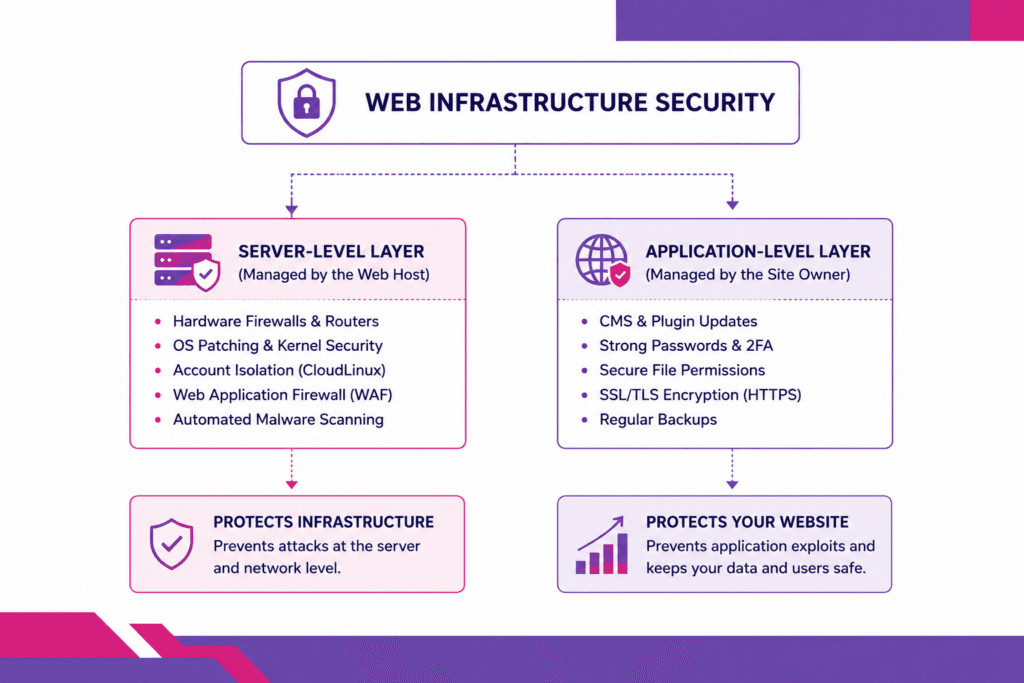
To answer whether web hosting includes malware protection, you must first understand that every website operates on two distinct layers of software infrastructure: the Server Level and the Application Level.
1. The Server-Level Layer (The Host’s Responsibility)
The server level encompasses the physical host hardware, the underlying operating system (such as AlmaLinux or CloudLinux), network routing, port configurations, and web server software (such as Nginx, Apache, or LiteSpeed).
A reputable web host is strictly responsible for protecting this physical and virtual infrastructure. They deploy hardware firewalls, protect against Distributed Denial of Service (DDoS) attacks, patch operating system vulnerabilities, and ensure that one compromised customer account cannot infect neighboring accounts on the same physical server.
2. The Application-Level Layer (The User’s Responsibility)
The application level consists of everything installed inside your web hosting account. This includes your Content Management System (CMS) like WordPress or Joomla, installed plugins, active themes, database contents, media uploads, and custom code scripts.
If an attacker exploits a vulnerability in an outdated WordPress plugin or guesses a weak administrator password, the attack occurs at the application level. Unless your web hosting package explicitly includes managed application security or active malware removal, fixing application-level breaches traditionally falls on the website owner.
The Shared Responsibility Model in Web Hosting
Web hosting security operates on a Shared Responsibility Model. Understanding where the web host’s perimeter ends and where your responsibility begins is essential for preventing cyber disasters.
| Security Task / Feature | Web Host Responsibility | Site Owner Responsibility |
|---|---|---|
| Server OS Security Updates | Included | Not Applicable |
| Hardware Firewall Management | Included | Not Applicable |
| Account Isolation (CageFS/CloudLinux) | Included | Not Applicable |
| CMS Core & Plugin Updates | Excluded (Unless Managed) | Primary Responsibility |
| Strong Password & 2FA Enforcement | Excluded | Primary Responsibility |
| Removing Unused Themes & Plugins | Excluded | Primary Responsibility |
| Server-Level Malware Scanning | Included (Varies by host) | Supplemental |
| Application-Level Malware Cleanup | Excluded (On budget hosts) | Primary Responsibility |
For instance, if you purchase standard cPanel shared hosting, your web host maintains the server health, but you remain responsible for maintaining your website’s application code, database, and login credentials.
What Web Hosting Malware Protection ACTUALLY Includes
When a host advertises “Included Malware Protection,” what security tools are actually working in the background? On modern, high-grade hosting platforms, several automated defense mechanisms actively safeguard your data.
[ Incoming Network Traffic ]
           │
           ▼
[ Hardware Firewall & DDoS Protection ]
           │
           ▼
[ Web Application Firewall (ModSecurity / WAF) ]
           │
           ▼
[ Account Isolation Layer (CloudLinux / CageFS) ]
           │
           ▼
[ Server-Level Malware Scanner (Imunify360 / CXS) ] ──> [ Auto-Quarantine Suspicious Code ]
           │
           ▼
[ Clean Web Request Delivered to Website ]
1. Web Application Firewalls (WAF)
A Web Application Firewall sits between incoming web traffic and your server. It inspects incoming HTTP requests for known attack vectors—such as SQL Injection (SQLi), Cross-Site Scripting (XSS), and Remote File Inclusion (RFI)—and drops malicious connections before they touch your website code.
2. Automated Server-Level Malware Scanners
Top-tier hosting providers deploy enterprise security software (such as Imunify360, CXS, or ConfigServer Security) directly onto their servers. These platforms constantly scan file system changes in real time. If a hacker uploads a malicious PHP backdoor script via an exploited form, the scanner detects the file signature, quashing its execution and placing it into quarantine immediately.
3. Account Isolation Systems
On unmanaged, budget legacy hosting platforms, if Site “A” gets infected with a self-replicating worm, that malware could potentially bleed through the file system and infect Site “B”.
Modern high-performance hosts prevent this by enforcing virtual containerization (such as CloudLinux CageFS). Each user account resides in its own isolated virtual fence, completely invisible to other tenants on the server.
4. Brute-Force Attack Mitigation
Botnets attempt thousands of password guesses per minute against WordPress admin portals (/wp-login.php) and SSH/FTP ports. Hosting security stacks automatically detect these high-frequency authentication failures and block the offending IP address at the server firewall tier.
What Web Hosting Malware Protection DOES NOT Cover
While enterprise web hosts maintain robust server defenses, relying solely on basic web hosting protection can leave dangerous security blind spots. Here is what typical hosting malware protection does not cover:
1. Application-Level Vulnerabilities (Zero-Day Exploits)
If you are running an outdated plugin containing a zero-day code execution vulnerability, an attacker can bypass traditional file upload filters. The server hardware is completely secure, but your application code allows the hacker to modify files from within. To understand how these attack vectors manifest, review our analysis on common WordPress security attacks targeting unpatched CMS environments.
2. Stolen Admin Credentials & Phishing
If an attacker steals your cPanel or WordPress administrator credentials via a phishing email or keylogger on your local computer, the host server views their login as legitimate user activity. The host cannot prevent an authorized admin session from uploading malicious code or editing template files.
3. Manual Malware Cleanup and Repair
If malware slips past server filters and infects your database or injects spam links into hundreds of posts, standard budget hosts will simply send you an alert or suspend your account to protect the network. They rarely clean the infected code, repair broken databases, or remove your domain from search engine blacklists unless you pay steep additional cleanup fees.
Budget Hosts vs. Premium Managed Hosts: A Security Comparison
The depth of malware protection depends heavily on the quality and architecture of your web hosting provider.
| Security Feature | Budget / Legacy Shared Hosts | Premium Managed Hosting (Limitless Hosting) |
|---|---|---|
| Real-time File Scanning | On-demand / Weekly scans only | Real-time active file monitoring |
| Malware Action | Account suspension without help | Automated quarantine & isolation |
| Server Isolation | Shared file permissions (Risky) | Enterprise CloudLinux CageFS |
| Proactive Patching | Delayed OS patching | KernelCare zero-downtime security patching |
| Web Application Firewall | Basic / Rule-based | Advanced AI-driven rule sets |
| Malware Remediation Support | Paid add-on ($100-$300/cleanup) | Proactive assistance & support |
Budget hosts often operate on paper-thin profit margins, meaning they treat security as a revenue-generating add-on. They allow your site to get infected, suspend your service, and force you to buy expensive third-party security addons.
In contrast, high-performance providers integrate enterprise security tooling directly into their hosting stack because maintaining clean, secure servers reduces long-term infrastructure overhead. To explore how advanced security research elevates infrastructure protection, read our overview on how masters in cyber security transform hosting security.
5 Critical Types of Web Malware Protecting Your Site Against
Understanding what malware looks like helps site owners recognize indicators of compromise early:
| Malware Type | Primary Threat & Impact |
| Backdoors | Grants attackers permanent, unauthorized remote administrative access to your server files. |
| SEO Spam | Injects thousands of fake pharma or gambling links into your content, destroying Google rankings. |
| Malicious Redirects | Redirects mobile visitors away from your site to dangerous phishing or scam landing pages. |
| Crypto Miners | Hijacks your server CPU/RAM to mine cryptocurrency causing severe site slowdowns and crashes. |
| Web Shells | Interactive web interfaces allowing hackers to execute Linux commands and manipulate databases. |
- Backdoors: Small, obfuscated scripts (often disguised as core files like
wp-config.phporindex.php) that allow hackers to bypass standard login forms. - SEO Spam (Pharma Hacks): Injects spam keyword pages into your database. Search engine crawlers index these pages, causing severe organic ranking drops.
- Malicious Redirects: JavaScript or
.htaccessredirects that send human visitors to malicious scam sites while showing normal content to Googlebot. - Web Shells: Advanced scripts that give attackers a command-line interface to upload, delete, and modify server files at will.
- Cryptominers: Background processes that utilize server processing power to mine digital currency, leading to high CPU usage and sluggish site performance.
How to Build a Complete, Multi-Layered Security Strategy
Because security is a shared responsibility, relying on your web host alone is not enough. To create a multi-layered defense strategy, follow these essential steps:
1. Implement Strict Application-Level Security
If you run WordPress, secure your application perimeter by enforcing strict hardening policies:
- Keep CMS core files, active themes, and plugins updated continuously.
- Enforce complex passwords and mandatory Two-Factor Authentication (2FA) for all administrative accounts.
- Remove unused or abandoned plugins and themes to reduce your attack surface.
- Implement our actionable security tips to protect your website from common application-level vulnerabilities.
2. Upgrade to Isolated or Managed Hosting Environments
If your website handles sensitive business data, client payment information, or mission-critical traffic, sharing server resources on budget hosts represents an unacceptable risk.
Upgrading to an isolated managed VPS hosting environment guarantees dedicated server resources, custom firewall rules, isolated root channels, and targeted malware detection configurations tuned specifically for your stack.
3. Deploy External Security and Automated Vulnerability Scanners
While your hosting server monitors internal file systems, external automated scanning tools inspect your digital footprint from the outside world.
Pairing your host’s internal security with an external AI vulnerability scanner allows you to discover public-facing port exposures, SSL/TLS handshake anomalies, DNS vulnerabilities, and outdated software headers before malicious actors exploit them.
4. Maintain Off-Site Automated Backups
The ultimate safety net against catastrophic malware infections or ransomware is a clean, reliable backup.
Never store backups solely on the same server as your live website. If malware infects your account, it can corrupt or overwrite your local backup files. Always configure automated daily backups to transfer securely to an off-site cloud location or secondary storage node.
Limitless Hosting
Get the speed your website deserves with storage and optimized server resources.
Conclusion: Security is a Partnership, Not a Commodity
So, does web hosting include malware protection?
The answer is yes, but only as part of a shared responsibility model. High-performance web hosts deliver essential server-level defenses, hardware firewalls, brute-force blocking, account isolation, and automated file scanning. However, hosts cannot prevent user-side mistakes, such as weak passwords, unpatched application code, or compromised third-party plugins.
Achieving complete digital peace of mind requires partnering with a host that takes infrastructure security seriously while implementing disciplined application hygiene on your end.
At Limitless Hosting, we build security into the foundation of every hosting plan. From CloudLinux account isolation and LiteSpeed Web Application Firewalls to real-time malware scanning and automated backup routines, we protect your infrastructure so you can focus on growing your business.
Secure your website with enterprise-grade infrastructure today—explore our high-performance, secure hosting plans at Limitless Hosting!
Frequently Asked Questions (FAQs)
1. Will my web host automatically clean malware if my site gets hacked?
It depends on your web host and hosting plan. Most low-cost, budget shared hosts will not clean infected files for free; instead, they will quarantine suspicious files or suspend your account until you clean the site yourself or pay for an expensive cleanup add-on. Premium managed hosts provide real-time automated quarantine tools (like Imunify360) and support staff to guide you through remediation.
2. Can a website on shared hosting get infected by another site on the same server?
On modern, high-quality shared hosting platforms, no. Reputable hosts use account isolation software (such as CloudLinux CageFS) to isolate every user account inside its own virtual container. However, on outdated or poorly configured servers that lack account isolation, malware on one site can theoretically spread to adjacent sites.
3. Why did my web host suspend my account after a malware detection?
Web hosts suspend infected accounts to protect the rest of the server network and preserve email deliverability. If a hacked account begins sending millions of spam emails or launching DDoS attacks, the server’s IP address will be blacklisted globally, affecting all other customers sharing that IP address.
4. Do free security plugins replace the need for host-level security?
No. Security plugins (like Wordfence or Sucuri) operate at the application level after web traffic reaches your server. Host-level security tools (like server firewalls and ModSecurity) drop malicious connections at the network edge before they ever execute PHP code, consuming far fewer server resources and providing superior protection.
5. How can I tell if my web host includes automated malware scanning?
Check your web hosting feature specification list or log in to your control panel (cPanel or DirectAdmin). Look for security icons like Imunify360, CXS, ClamAV, or Virus Scanner. If you are unsure, contact your host’s support team and ask if they perform real-time automated file scanning and quarantine.
6. What should I do immediately if I receive a malware notification from my host?
- Do not panic. Read the host’s notification carefully to identify the flagged files.
- Change all passwords: Update your control panel, FTP, SSH, database, and admin user passwords immediately.
- Restore a clean backup: If you have an uninfected off-site backup, restoring it is often the fastest recovery path.
- Update everything: Update your CMS core, themes, and plugins to patch the vulnerability that allowed access.
- Contact your host: Notify your web host’s support team once cleanup is complete so they can re-scan your account and lift any suspensions.
Read more:
- Cheap Reseller Hosting for Agencies: What to Look For in 2026
- How to Choose the Right VPS Without Overspending: 10th Anniversary VPS Offer:
- The Ultimate Guide to Click-to-Call: Turn Website Traffic into High-Converting Phone Leads
- What Is GoHighLevel? Complete Guide for Beginners
- How to Make the Most of Web Hosting Discounts: Limitless Hosting 10th Anniversary Sale