


System stability and operational uptime are the foundation of modern web hosting. When a low-privilege web hosting client or a compromised PHP script can trigger a full host system crash, service level agreements (SLAs) fail, databases risk corruption, and tenant isolation breaks down.
A critical security vulnerability designated as CVE-2026-68138, dubbed RtabRace, has been identified in the Linux kernel and specifically impacts multi-tenant environments running CloudLinux OS. The vulnerability allows local, unprivileged users—such as shared hosting account tenants, SSH users, or web applications executing arbitrary PHP code—to cause a kernel panic and crash the physical or virtual host node instantly.
For web hosts, cloud operators, and system administrators running CloudLinux 7, CloudLinux 8, or CloudLinux 9, addressing this vulnerability is a high priority. In this technical guide, we will examine the root cause of CVE-2026-68138, analyze its security impact on shared hosting environments, provide step-by-step kernel patching instructions, and outline best practices for maintaining kernel security without incurring service downtime.
1. Technical Breakdown: What Is CVE-2026-68138 (RtabRace)?
CVE-2026-68138 (RtabRace) is a race condition vulnerability located within the Linux kernel’s network subsystem, specifically handling routing table allocation, cleanup, and reference counts (rtab handling structures).
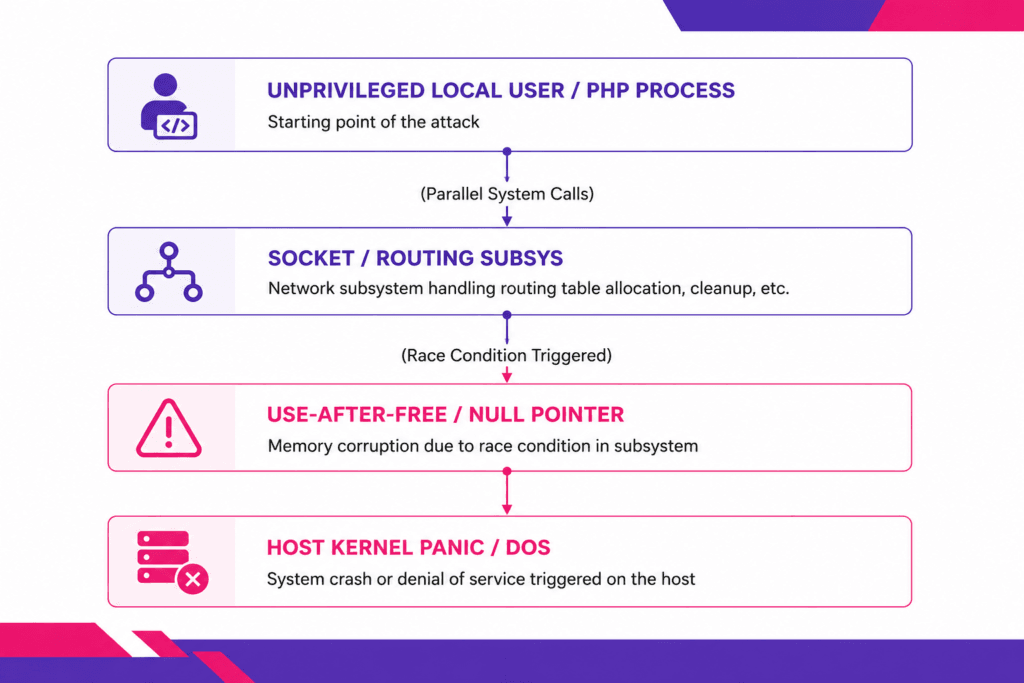
The Root Cause: Kernel Race Condition
The vulnerability arises when concurrent, asynchronous system calls manipulate internal network routing table metrics or socket options simultaneously. Under specific race conditions:
- An unprivileged user opens multiple network sockets or netlink requests targeting kernel routing table attributes (
rtab). - Concurrent system calls trigger a race condition during memory reallocation or garbage collection of routing structures.
- The kernel fails to properly lock the data structure, leading to a Use-After-Free (UAF) condition or a Null Pointer Dereference.
- The system triggers a kernel oops or kernel panic, bringing down the entire operating system instantly.
Because the flaw exists in the core kernel networking stack, an attacker does not require root privileges, elevated capabilities (CAP_NET_ADMIN), or access to special hardware devices. Any standard local user account—including cPanel or DirectAdmin tenant user accounts (cpaneluser, dauser, www-data, nobody)—can execute a compiled exploit payload or loop script to crash the entire host node.
2. Why RtabRace Is Particularly Dangerous for CloudLinux Web Hosting
CloudLinux OS is the industry standard for shared web hosting platforms because of its advanced containerization technology, specifically Lightweight Virtual Environments (LVE) and CageFS. These mechanisms isolate individual tenant accounts, restricting memory, CPU, I/O, and file system access.
However, kernel-level vulnerabilities like RtabRace (CVE-2026-68138) operate beneath userland isolation containers.
High Severity Impact in Multi-Tenant Architectures:
- Bypassing CageFS & LVE Isolation: While CageFS restricts file system visibility and LVE throttles user CPU/RAM limits, both rely on the underlying Linux kernel remaining healthy. When an unprivileged process triggers a kernel panic via
rtabsystem calls, the entire kernel halts, bringing down every neighboring tenant on the host simultaneously. - Trivial Denial of Service (DoS): Malicious actors who purchase cheap shared hosting accounts or exploit unpatched WordPress sites can run simple race-condition loops to crash hosting nodes repeatedly, causing extended downtime.
- Database & File System Corruption: Sudden, hard host crashes caused by kernel panics interrupt active database transactions (MySQL / MariaDB) and file writes, leading to corrupted tables and uncommitted file buffers.
Web hosts managing multi-tenant environments must understand how underlying infrastructure architecture interacts with kernel security. Evaluating the differences between isolated virtual containers in shared hosting vs reseller hosting highlights how kernel stability forms the single point of failure for all hosted accounts on a shared node.
3. Affected Systems and Kernel Versions
CloudLinux has confirmed that CVE-2026-68138 affects multiple kernel branches across their supported operating system releases. System administrators should inspect their active running kernels immediately.
Vulnerable CloudLinux Operating Systems:
- CloudLinux OS 7 (Kernel branch
3.10.0-x) - CloudLinux OS 8 (Kernel branch
4.18.0-x) - CloudLinux OS 9 (Kernel branch
5.14.0-x) - CloudLinux OS 8.x / 9.x Hybrid Kernels
How to Check Your Current Running Kernel Version
To check whether your host node is running a vulnerable kernel, connect to your server via SSH as root and execute:
uname -r
Example Output:
5.14.0-427.13.1.lve.el9.x86_64
If your running kernel build predates CloudLinux’s official security release containing the CVE-2026-68138 patch, your system is vulnerable to local Denial of Service attacks.
4. Mitigation and Patching Strategies for CloudLinux
System administrators have two primary paths to mitigate CVE-2026-68138: applying standard RPM updates followed by a system reboot, or deploying rebootless live kernel patches via TuxCare / KernelCare.
Strategy A: Applying CloudLinux Official Kernel Updates (Requires Reboot)
CloudLinux has released updated kernel packages across their official repositories containing backported fixes for RtabRace.
Step 1: Clean Package Caches
Ensure your system fetches the latest metadata from CloudLinux mirrors:
# For CloudLinux 8 / 9
dnf clean all
dnf check-update kernel

# For CloudLinux 7
yum clean all
yum check-update kernel
Step 2: Install Updated Kernel Packages
Execute the update command to pull the patched kernel binaries:
# For CloudLinux 8 / 9
dnf update kernel kmod-lve -y

# For CloudLinux 7
yum update kernel kmod-lve -y
Step 3: Schedule and Perform System Reboot
Because standard RPM updates write new kernel image files to the /boot partition, the new kernel takes effect only after a host reboot:
reboot
Step 4: Verify Post-Reboot Kernel
After the server finishes rebooting, verify that the new kernel version is active:
uname -r
Strategy B: Live Kernel Patching via KernelCare (Zero Downtime)
For production web hosting nodes, taking down servers for emergency kernel reboots interrupts client workflows, disrupts background cron jobs, and damages SLA commitments.
Hosting providers utilizing KernelCare (or TuxCare Live Patching) can apply the fix for CVE-2026-68138 in real time without rebooting the server.
Step 1: Check KernelCare Patch Status
To check if KernelCare has applied the patch automatically:
kcarectl --patch-info
Step 2: Force Immediate Patch Update
If automatic updates are disabled, trigger a manual patch fetch:
kcarectl --update
The KernelCare daemon allocates memory hooks to redirect vulnerable rtab system calls to patched kernel logic, securing the running kernel in memory within seconds without dropping active socket connections or requiring a reboot.
Maintaining server security and applying seamless patches are standard operational measures for fully managed VPS hosting solutions, ensuring infrastructure remains protected against zero-day vulnerabilities without requiring manual intervention from website owners.
5. Proactive Infrastructure & Service Monitoring During Patch Updates
Whether you choose scheduled server reboots or live kernel patching, kernel maintenance carries operational risk. If a kernel update triggers driver conflicts with storage controllers or network interface cards (NICs), host nodes can fail during boot up.
To ensure continuous uptime visibility during kernel maintenance, operations teams must implement external, independent infrastructure tracking.
[ Web Host Server Node ] ──(Network Query)──► [ Aepto Monitoring Platform ]
   * Kernel Update Event                         * External Latency Checks
   * Maintenance Reboot                          * Real-Time Incident Alerts
Utilizing real-time uptime monitoring via platforms like Aepto ensures that system administrators receive immediate notifications if a server node fails to complete its reboot cycle or experiences routing anomalies after kernel updates.
External monitoring provides independent verification of network reachability, confirming that your host nodes are serving traffic cleanly post-patching.
6. How Limitless Hosting Safeguards Infrastructure Against Kernel Flaws
At Limitless Hosting, infrastructure security is engineered directly into our operational workflow. Protecting tenant web properties against zero-day threats like CVE-2026-68138 requires a combination of automated security, hardware redundancy, and proactive system administration.
1. Automated Rebootless Kernel Patching
All Limitless Hosting shared nodes, reseller platforms, and managed servers are protected by automated live-patching infrastructure. High-severity kernel vulnerabilities are patched in memory within hours of vendor disclosure, eliminating maintenance downtime for our clients.
2. Multi-Layer Security Perimeter
In addition to kernel-level hardening, our hosting stack incorporates automated web application firewalls (WAF), real-time behavioral intrusion detection, and comprehensive web hosting malware protection to block malicious scripts before they execute on our servers.
3. Enterprise NVMe Storage Redundancy
In the event of an emergency host reboot, client data integrity is protected by high-throughput enterprise NVMe storage arrays. Utilizing fast SSD server storage ensures that file system checks (fsck) and database recovery journals execute in seconds rather than minutes, minimizing downtime.
7. Hardening Linux Web Servers Against Local Exploit Vectors
While updating the kernel resolves CVE-2026-68138 specifically, securing Linux hosting servers against future local exploit attempts requires a defense-in-depth approach. Implement the following sysctl and system security configurations to minimize attack surfaces:
1. Restrict Kernel Pointer Visibility (kptr_restrict)
Prevent local unprivileged users from reading kernel memory addresses, which are frequently used by exploit developers to bypass Address Space Layout Randomization (ASLR):
sysctl -w kernel.kptr_restrict=2
echo "kernel.kptr_restrict = 2" >> /etc/sysctl.conf
2. Restrict dmesg Access (dmesg_restrict)
Prevent unprivileged local users from inspecting kernel ring buffer logs (dmesg), preventing them from gathering debugging information during race condition exploit attempts:
sysctl -w kernel.dmesg_restrict=1
echo "kernel.dmesg_restrict = 1" >> /etc/sysctl.conf
3. Disable Unprivileged eBPF
Extended Berkeley Packet Filters (eBPF) can be abused by local attackers to manipulate kernel memory. Disable unprivileged eBPF access:
sysctl -w kernel.unprivileged_bpf_disabled=1
echo "kernel.unprivileged_bpf_disabled = 1" >> /etc/sysctl.conf
Blazing Fast Hosting.
Get the speed your website deserves with storage and optimized server resources.
4. Enforce Strict Application-Level Security Rules
Securing the underlying server infrastructure is only half the battle; web applications running on the server must also be hardened. Encouraging site owners to follow proven security tips to protect your website prevents compromised web scripts from serving as entry points for local system exploit execution.
Technical Summary Matrix: CVE-2026-68138 (RtabRace)
| Vulnerability Attribute | Technical Details |
|---|---|
| CVE Identifier | CVE-2026-68138 |
| Vulnerability Name | RtabRace |
| Vulnerability Type | Race Condition / Use-After-Free (UAF) |
| Target Subsystem | Linux Kernel Networking (rtab routing table management) |
| Privileges Required | Unprivileged Local User (No root required) |
| Primary Impact | Denial of Service (Kernel Panic / Host Crash) |
| Affected Operating Systems | CloudLinux OS 7, 8, 9 & Linux Kernel sub-versions |
| Mitigation Method 1 | yum update kernel / dnf update kernel + System Reboot |
| Mitigation Method 2 | KernelCare live patch update (kcarectl --update) |
Conclusion
The RtabRace vulnerability (CVE-2026-68138) highlights the critical importance of low-level kernel security in multi-tenant environments. Because unprivileged users can exploit race conditions in kernel routing structures to trigger instant host panics, unpatched servers remain at constant risk of local Denial of Service attacks.
System administrators running CloudLinux must immediately check their running kernel builds, deploy updated kernel packages, or apply rebootless patches via KernelCare to maintain node stability.
Experience ultra-stable, managed web hosting backed by enterprise security, high-speed NVMe infrastructure, and proactive zero-day patching. Explore high-performance hosting solutions at Limitless Hosting today!
Frequently Asked Questions (FAQs)
1. Can RtabRace (CVE-2026-68138) be exploited remotely over the internet?
No. CVE-2026-68138 is a local privilege vulnerability. An attacker must have local execution access on the target server. However, in shared web hosting environments, an attacker can obtain local execution access by acquiring a standard client account, establishing SSH access, or exploiting a web application file upload flaw in a hosted site.
2. Does CloudLinux CageFS protect my server against CVE-2026-68138?
No. While CageFS encapsulates user execution environments, system calls executed by userland binaries pass directly to the underlying host kernel. When the race condition in the kernel’s routing table subsystem is triggered, the resulting kernel panic crashes the entire physical node regardless of CageFS containment.
3. How do I apply the fix for CVE-2026-68138 without rebooting my server?
You can apply live kernel patches using KernelCare or TuxCare. Running the command kcarectl --update fetches the latest binary patches from CloudLinux repositories and hooks the patched logic directly into running kernel memory without dropping connections or requiring a system reboot.
4. Will updating my CloudLinux kernel break existing website files or databases?
Standard kernel updates patch operating-system-level code and do not modify web files, application code, or database structures. However, executing a standard kernel update requires a server reboot, which temporarily interrupts active network connections. Always verify backup integrity prior to scheduling maintenance reboots.
5. How can I confirm whether KernelCare successfully patched CVE-2026-68138?
Run kcarectl --patch-info via SSH as root. The terminal output will display applied patch IDs along with associated CVE references. Search the output list for CVE-2026-68138 to confirm that the memory patch is active.
Latest Posts:
- How Much Storage Does a WordPress Website Need?
- WordPress Scheduled Posts Not Publishing on Shared Hosting? How to Fix It
- What Can We Expect From CloudFest 2026?
- How Aepto Browser Extension Can Help You Understand a Website’s Hosting Stack
- CloudFest 2025 and Its Impact on Web Hosting & Cloud Infrastructure